Consultancy Quoted $50K for Analytics. I Built It in 8 Hours.
Last month, a consultancy told me Google Analytics wasn't good enough. They were right. GA4 was losing 40-60% of my data to ad blockers, and I needed server-side event tracking to capture accurate traffic across three domains.
Their solution? A custom analytics platform. Their timeline? 3-6 months. Their price? $50,000+.
I built it myself in 8 hours using Context Engineering. It costs $0.78 per month to run. And it handles thousands of requests per day across all three properties.
Here's how.
The Problem: GA4 Is Broken By Design
Google Analytics 4 has a fundamental flaw: it relies on client-side JavaScript. That means:
- •Ad blockers strip the tracking code (40-60% data loss)
- •Privacy browsers disable pixels (Safari, Brave, Firefox)
- •VPNs hide referrer data (no idea where traffic comes from)
- •Search queries are hidden ("not provided" everywhere)
I was seeing 200 views per day during a traffic spike, but I knew it was undercounting. The consultancy confirmed it: "You need server-side tracking. Your CloudFront logs can't be blocked."
They weren't wrong. They were just catastrophically expensive.
What The Consultancy Pitched
Phase 1: Discovery & Architecture (Months 1-2) - $15K
- • Requirements gathering sessions
- • Architecture design documents
- • Technology selection workshops
- • Detailed project plan
Phase 2: Implementation (Months 2-4) - $25K
- • CloudFront log parser development
- • DynamoDB schema design
- • Lambda function implementation
- • API Gateway configuration
Phase 3: Dashboard Development (Months 4-5) - $15K
- • React frontend development
- • Chart library integration
- • Authentication system
- • Production deployment
Phase 4: Testing & Handoff (Months 5-6) - $10K
- • QA testing
- • Documentation writing
- • Knowledge transfer sessions
- • 30-day support plan
Total: $65,000 and 6 months of calendar time. For three websites that share the same infrastructure.
What I Actually Built
Saturday Afternoon
- • CloudFront log parser (parses access logs on S3 upload)
- • DynamoDB schema (sessions, events, with GSIs for querying)
- • Lambda functions (log processing, API endpoints)
- • API Gateway (REST API for dashboard queries)
Saturday Evening (after a nap)
- • Client-side event tracking (pageviews, navigation, engagement)
- • Session journey reconstruction (full user paths)
- • AI hallucination detection (tracks 404s, pattern matches AI-generated URLs)
Sunday Morning
- • React dashboard (analytics + journeys tabs)
- • Charts and visualizations (Recharts)
- • Referrer consolidation (groups traffic sources)
- • Journey drill-down (click session → see full path)
Total: 8 hours of work. $0 upfront cost. $0.78/month to operate.
How Context Engineering Made This Possible
I didn't start from scratch. I started by querying my ADRs (Architecture Decision Records)—markdown files that document how we build Lambda functions, DynamoDB tables, and APIs at scale.
$ ./outcome-ops-assist "How do we structure Lambda functions for log processing?"

Relevant ADRs:
- terraform-aws-modules/lambda/aws v8.1.2
- S3 event triggers with SQS dead-letter queues
- Error handling with exponential backoff
- Batch processing patterns (25 items max)

Generated: lambda-log-parser.tf
Every pattern was already documented. Every module was already vetted. I wasn't inventing architecture—I was applying proven patterns to a new use case.
The consultancy would have spent 2 months on "architecture design." I spent 30 seconds querying what we already know.
What The Platform Actually Does
Server-Side Traffic Capture
- •CloudFront access logs → S3 (automatic)
- •Lambda parses logs on upload (can't be blocked)
- •Extracts: domain, path, referrer, user-agent, country, timestamp
- •Stores in DynamoDB with GSIs for fast querying
Client-Side Journey Tracking
- •First-party tracking domains (tracking.outcomeops.ai, etc.)
- •Captures: pageviews, navigation, time on page, scroll depth
- •Session reconstruction (entry → exploration → exit)
- •Custom event support (demo_requested, contact_submitted, etc.)
AI Hallucination Detection
- •Tracks 404s before redirect
- •Pattern matches AI-generated paths (/officialsite, /.well-known/*)
- •Flags sessions with AI assistance
- •Shows which users are researching with ChatGPT/Claude
Analytics Dashboard
- •Traffic by hour (when do people actually visit?)
- •Referrer consolidation (which sources drive which content?)
- •Engagement metrics (bounce rate, time on content)
- •Journey drill-down (click session → see full navigation path)
GA4 vs. Server-Side Analytics: What You Actually See
Here's what the platform showed me in the first few days since launch:
What GA4 Shows You:
- • Referrer: "(direct)" or "(not set)"
- • Source: "organic" (no detail)
- • AI traffic: Invisible (lumped into direct)
- • Per-page referrers: Painful to extract
- • Data accuracy: 40-60% missing (ad blockers)
What Server-Side Shows You:
- • Referrer: "youtube.com", "google.com.hk", "chatgpt.com"
- • Source: Exact domain and path
- • AI traffic: ChatGPT referrals detected
- • Per-page referrers: One-click filtering
- • Data accuracy: 100% (can't be blocked)
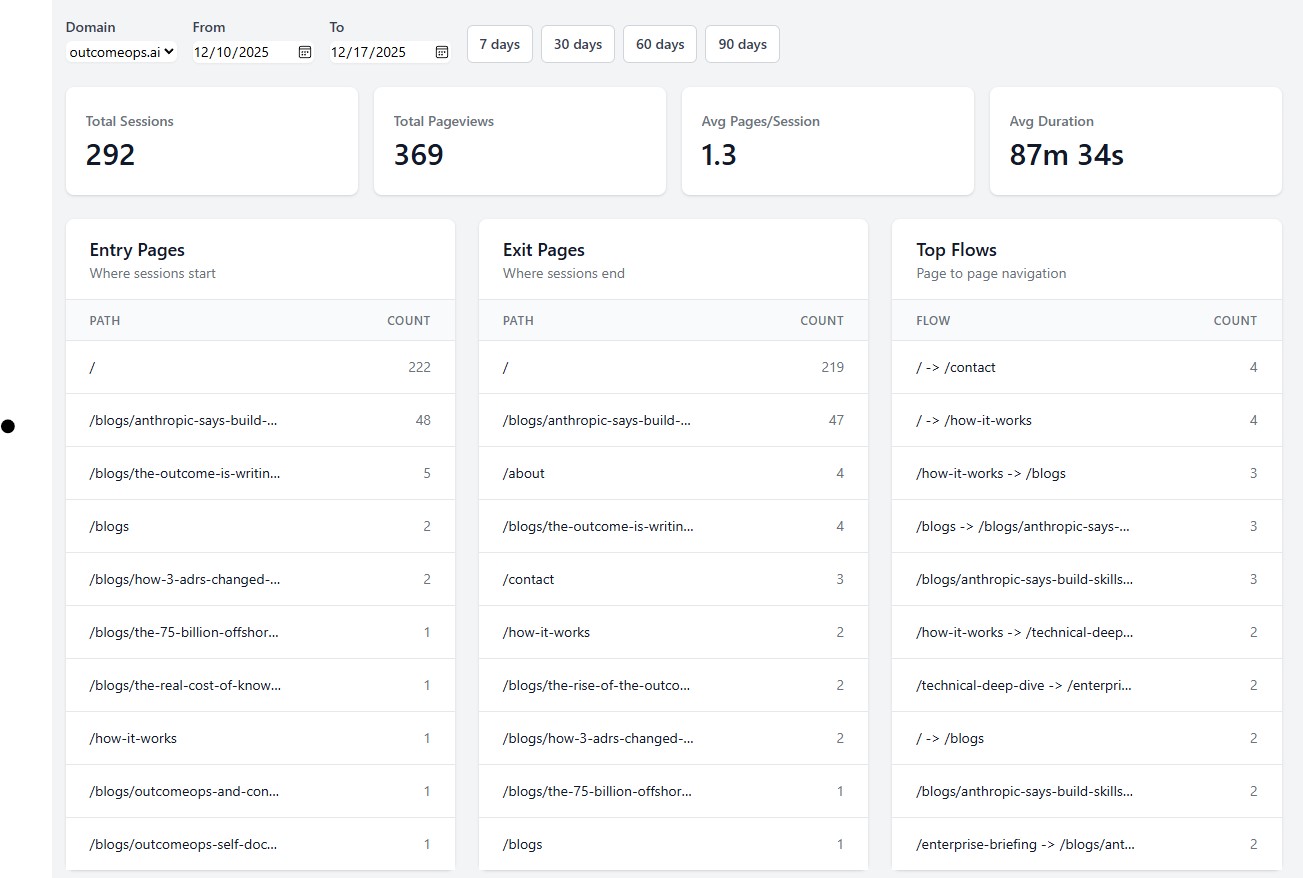
292 sessions. 369 pageviews. Entry pages, exit pages, and top navigation flows—all in one view. No sampling. No "data thresholding." Just real numbers.
The Money Shot: ChatGPT Is Sending Me Traffic
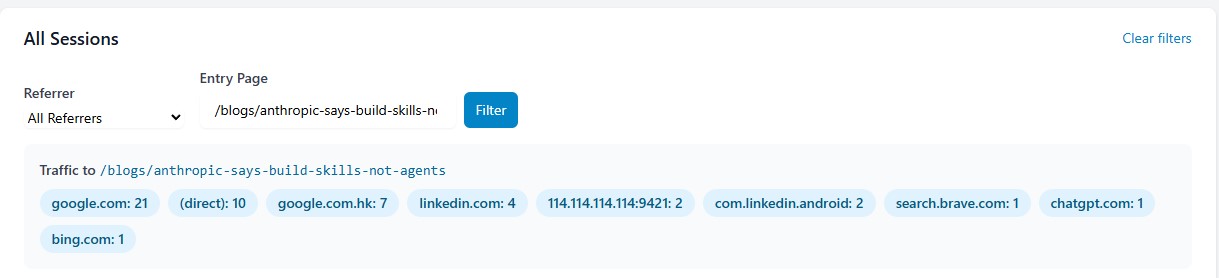
Look at this. I filtered to a single blog post and instantly see: 21 from Google, 10 direct, 7 from Google Hong Kong, 4 from LinkedIn, and 1 from chatgpt.com.
GA4 would show that ChatGPT referral as "direct" or "(not set)". I would never know AI is recommending my content. Server-side tracking captures what client-side JavaScript cannot.
This is the insight that matters: People are asking ChatGPT about Context Engineering, and it's sending them to my blog. GA4 hides this. My $0.78/month platform reveals it.
Deployed Across Three Domains
The same infrastructure handles:
- •OutcomeOps — My AI Engineering Platform
- •TheTek — My Personal Consulting Brand
- •CharacterAI Platform — My Character AI Product
Each property has:
- •Its own CloudFront distribution logging to S3
- •Its own first-party tracking subdomain
- •Shared Lambda functions (one codebase, all properties)
- •Isolated data (DynamoDB partition key includes domain)
Current
~1,000 events/day
$0.78/month
10x Growth
~10,000 events/day
$5-7/month
100x Growth
~100,000 events/day
$50-70/month
The consultancy's platform would cost the same whether I had 1 domain or 100. Mine scales linearly with usage.
The Meta-Lesson: Consultancies Gatekeep Simplicity
Server-side analytics isn't complex. It's:
- •Parse CloudFront logs (standard format, well-documented)
- •Store events in DynamoDB (key-value store)
- •Query with GSIs (DynamoDB native feature)
- •Display in React (standard web development)
But consultancies make it sound complex because complexity justifies cost.
"You need specialized expertise in CloudFront log parsing."
"DynamoDB schema design requires deep AWS knowledge."
"Event tracking architecture is mission-critical."
With Context Engineering, these problems dissolve:
- •CloudFront log format? Documented in ADR-012
- •DynamoDB patterns? ADR-034 has 6 examples
- •Lambda error handling? ADR-019 covers retry logic
- •API design? ADR-045 shows REST patterns
The "specialized expertise" is already captured. I just queried it.
Why This Matters For Enterprises
If a solo founder can build production-grade analytics in 8 hours, what does that mean for your enterprise transformation budget?
The $18M AWS ProServe engagement I led at Gilead Sciences? Context Engineering would have compressed 24 months into 6.
The platform engineering team at Comcast that eliminated DevOps waste? We could have shipped it in weeks instead of years.
Every "6-month consulting project" your company has planned? Most of them are 2-week projects with 5.5 months of overhead.
The consultancies aren't lying when they say you need 6 months. They're lying about why.
You Need 6 Months Because:
- • They have to staff the project (1-2 weeks)
- • Junior consultants need to learn your domain (4-6 weeks)
- • They build from scratch every time (12-16 weeks)
- • They document as they go (4-6 weeks)
- • They test and handoff (4-6 weeks)
You Need 8 Hours When:
- • Your patterns are already documented (ADRs)
- • AI can query and apply them (Context Engineering)
- • Senior engineers own the outcome (not billing hours)
From $50K to $0.78/month
The consultancy wasn't wrong that I needed server-side tracking. They were wrong about what it should cost.
Their Math:
- • 6 months × $130K average burdened consultant cost = $65K project
- • Plus ongoing hosting ($200-500/month for "managed infrastructure")
- • Plus maintenance retainer ($5K-10K/month for "production support")
My Math:
- • 8 hours × my time (free, because I own the company)
- • $0.78/month AWS costs (DynamoDB + Lambda + API Gateway)
- • Zero maintenance (serverless, auto-scaling, no ops burden)
The ROI for enterprises: Fire the consultancy. Hire engineers who use Context Engineering. Save 90% on every "transformation project."
This is exactly what I wrote about in How I Refactored a 1,348-Line Lambda Using Context Engineering. When your patterns are documented and queryable, AI doesn't guess—it executes.
OutcomeOps: The Future of AI Engineering
Opens Substack in a new tab to confirm. No spam — unsubscribe anytime.
See It In Action
Want to see how Context Engineering turns weekend projects into production platforms?
- • How ADRs compress months into hours
- • Why Fortune 500s waste billions on consulting
- • How to capture and apply your architectural knowledge
- • Real examples: Analytics, cloud platforms, compliance systems
The revolution isn't coming. It's shipping.
While consultancies are writing proposals, we're deploying production code. That's the difference between theory and transformation.